One governed door between AI agents and your company's systems.
Claude Code, Cursor and other agents connect to your tools through one URL. Gatehouse checks every call against your policies, asks a person in Slack when it matters, keeps credentials away from agents, and records everything.
- Works with any MCP client
- SSO, MFA and SCIM
- Cloud or self-hosted
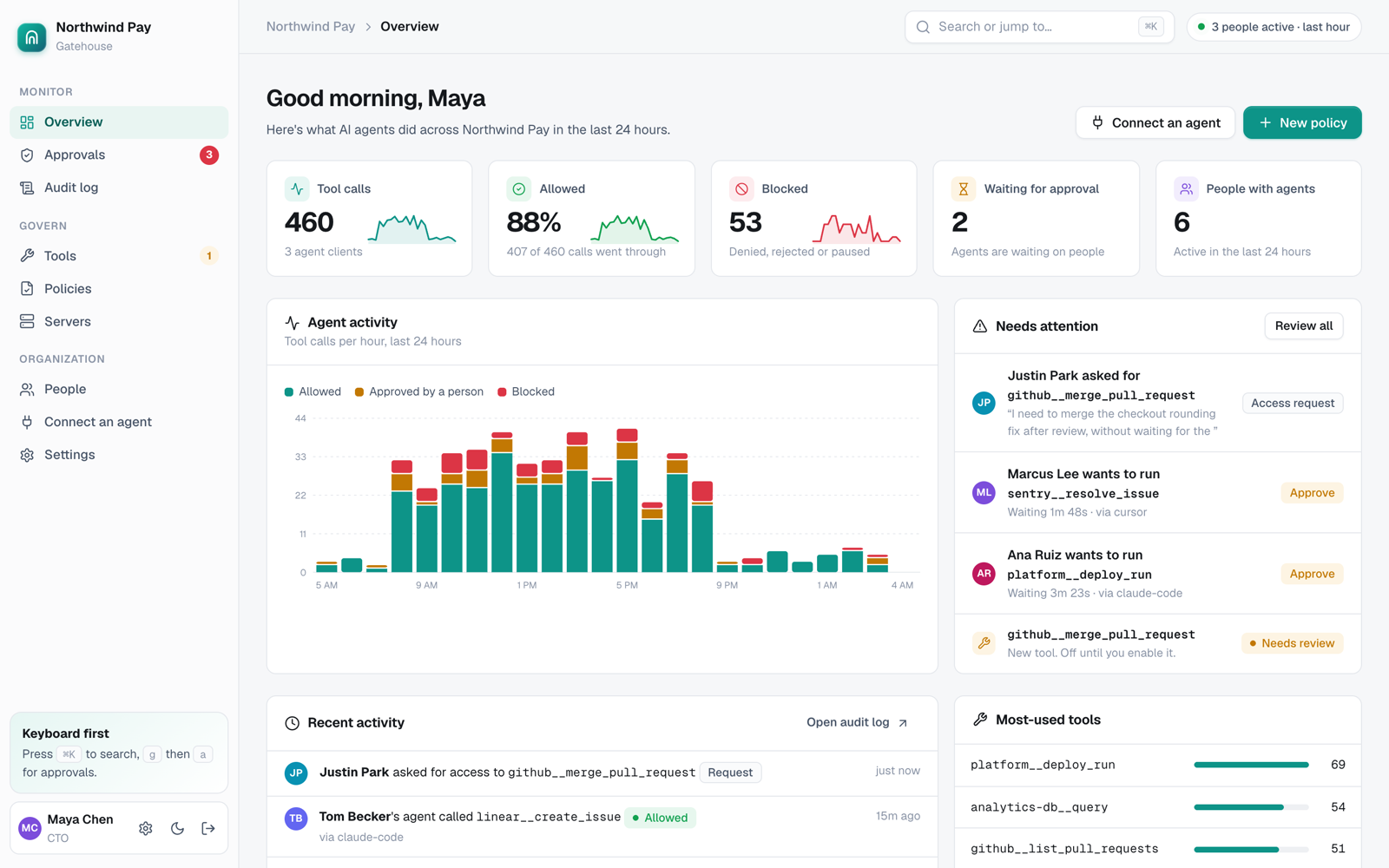
AI agents already touch production. Most companies can't see or control it.
Personal tokens everywhere
Each developer wires their agent to GitHub, databases and cloud accounts with their own long-lived keys.
No one approves risky actions
An agent can deploy, merge or delete as fast as it can type. There's no point where a person says yes.
No record of what happened
When an auditor asks what agents did last quarter, there's nothing to show them.
New attacks
Tool descriptions can carry hidden instructions, and a server can quietly change after you trust it.
So security teams choose between blocking agents and falling behind, or allowing them and hoping. Gatehouse is the third option.
Every call goes through seven checks
Agents connect once. Gatehouse connects to your MCP servers with your credentials and re-exposes their tools, checked.
- Connect agentsDevelopers add one URL and sign in with SSO.
- Add serversAdmins add MCP servers. New tools stay off until reviewed.
- Write policiesAllow, deny or require approval, by team, tool and argument.
- Approve in SlackRisky calls wait for a person, with the exact command shown.
Everything you need to say yes to agents
Plain policies
Allow, deny or require approval by tool, group, person and argument values, like "no production deploys from agents". Test any call before you save.
Learn moreApprovals in Slack
Risky calls pause and ping the right approver in Slack and the console. The agent continues the moment someone approves.
Learn moreRequest access from chat
Need a tool you don't have? Ask your agent. The request goes to admins with your reason, and approved tools appear automatically.
Learn moreCredentials stay out of agents
Gatehouse holds server credentials, encrypted with AES-256-GCM, and adds them only when calling the server. Per-person credentials are supported.
Learn moreSecret redaction
Keys and tokens in tool arguments are blocked, and secrets in results are redacted before they reach the model.
Learn moreTool-poisoning protection
Tool definitions are pinned when approved. If a server changes one, the tool pauses until an admin reviews a side-by-side diff with warnings.
Learn moreTamper-evident audit log
Every call and admin change is recorded and hash-chained, so edits are detectable. Export to CSV or stream to your SIEM.
Learn moreSSO, MFA and SCIM
Google, GitHub, Okta, Microsoft Entra ID or any OIDC or SAML provider. Require two-step verification. Provision people and groups with SCIM.
Learn moreGroups from your directory
Sync groups from Active Directory or LDAP, including nested groups, or map them from Entra ID and Okta. Write policies for groups you already have. Leavers lose access on the next sync.
Learn moreRoles and guardrails
Owners, admins, auditors and members. IP allow-lists, session limits, lockout and owner-only break-glass passwords.
Learn moreSelf-hosted
Run it in your own network with Docker or Kubernetes, load keys from your KMS or Vault, and run without internet access.
Learn moreA person decides, with the exact call in front of them
Who asked, which agent, which tool, the arguments and the policy that triggered it. Approve with full context, in the console or in Slack.
How approvals work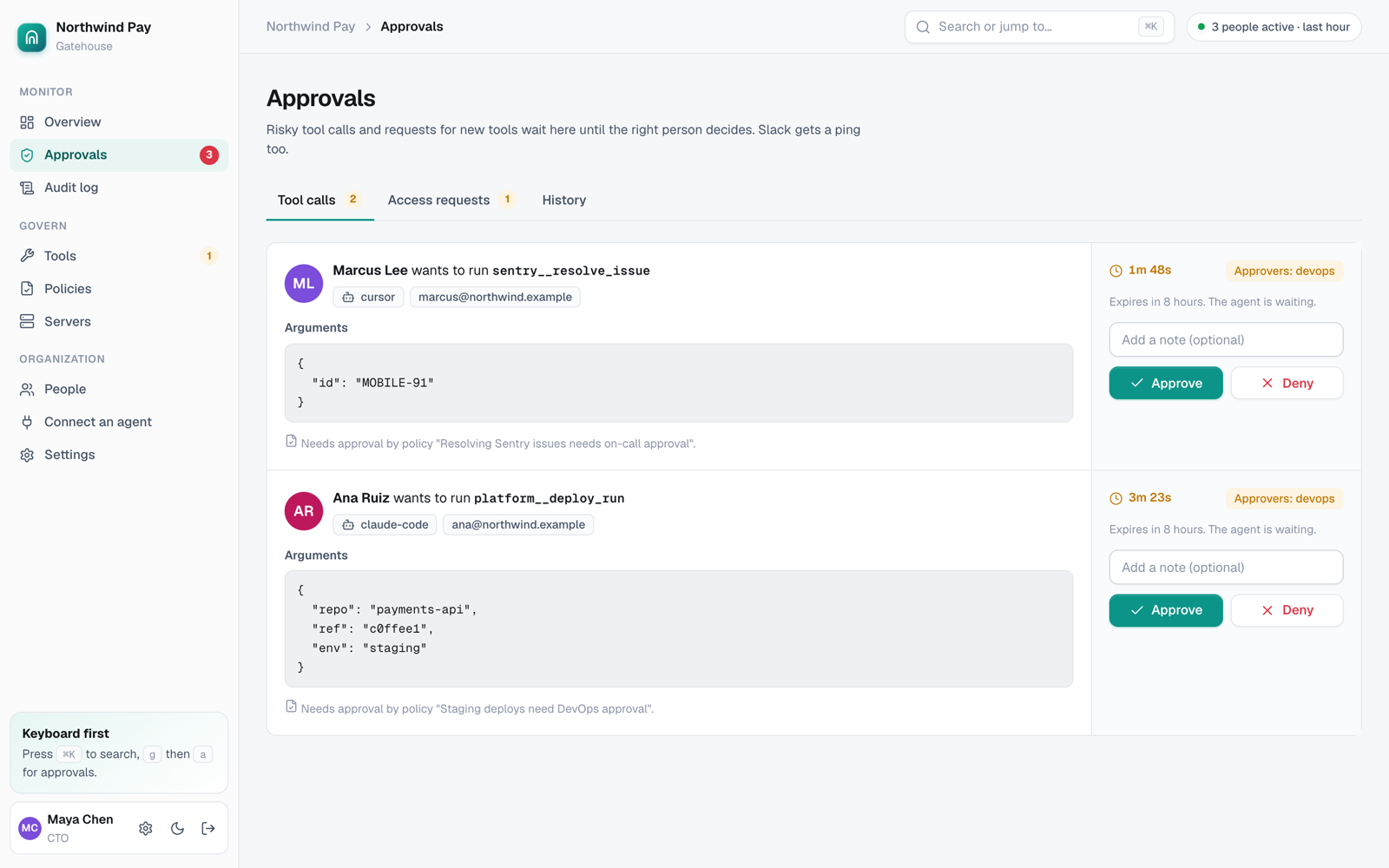
Review every tool before agents can use it
Each MCP server lists its tools. Turn them on one by one or in bulk, choose who can find them, and see usage at a glance.
Managing servers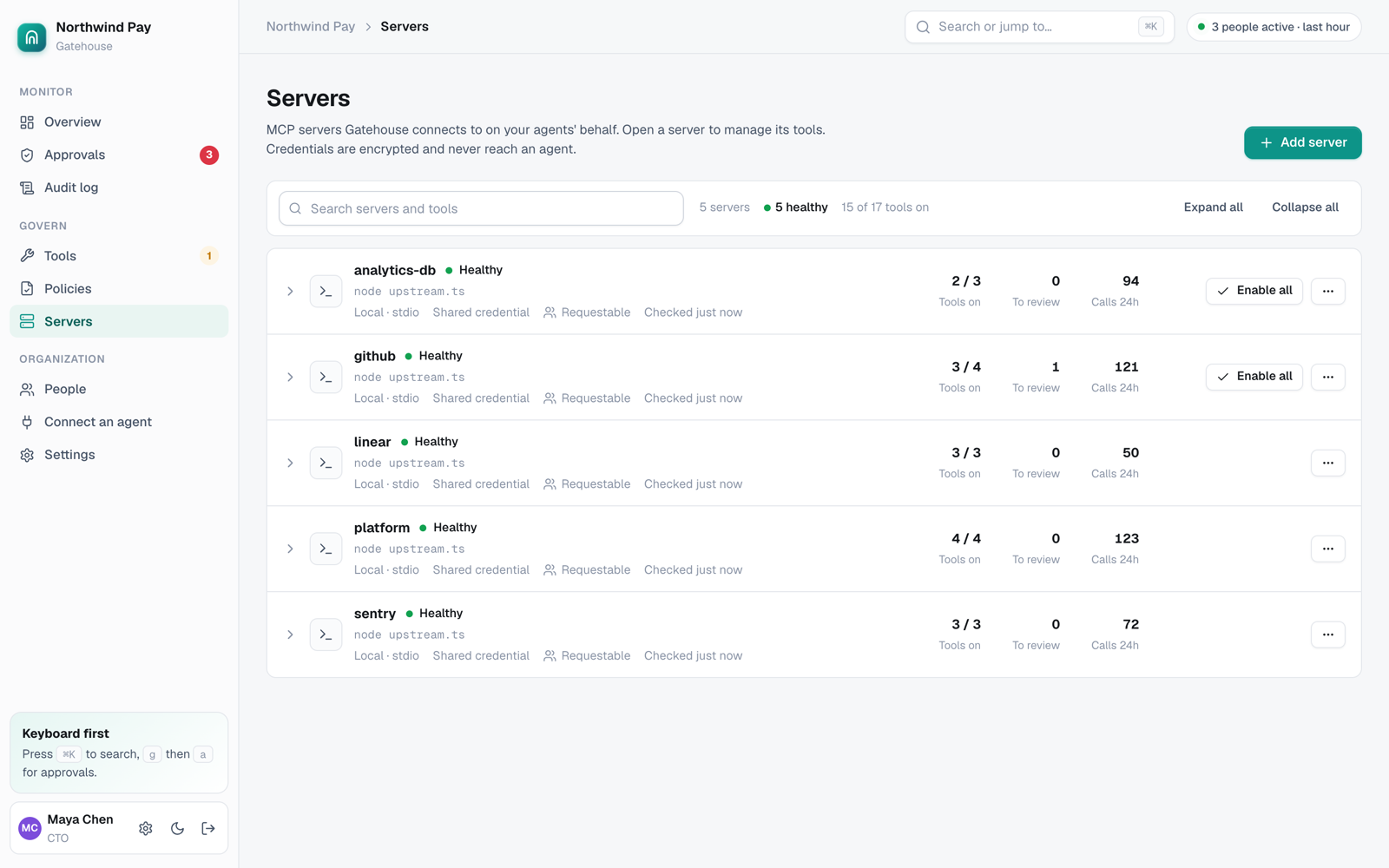
Rules anyone on the team can read
Pick tools from a searchable list, choose who the rule applies to and add conditions on arguments. The strictest matching rule wins.
Writing policies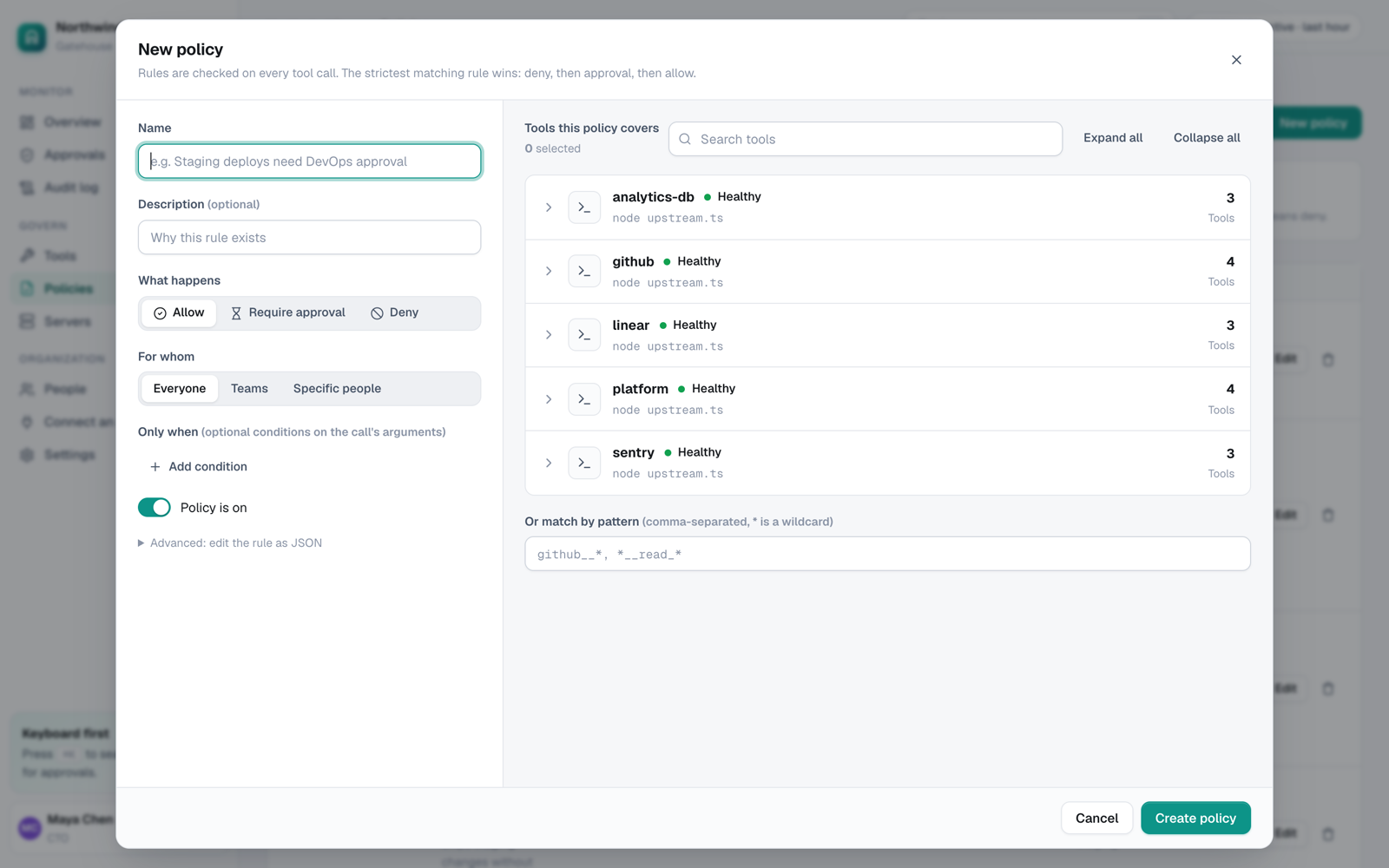
Evidence your auditors will accept
Every entry is linked to the one before it with a cryptographic hash. Gatehouse checks the chain on every view and tells you if anything was changed.
The audit log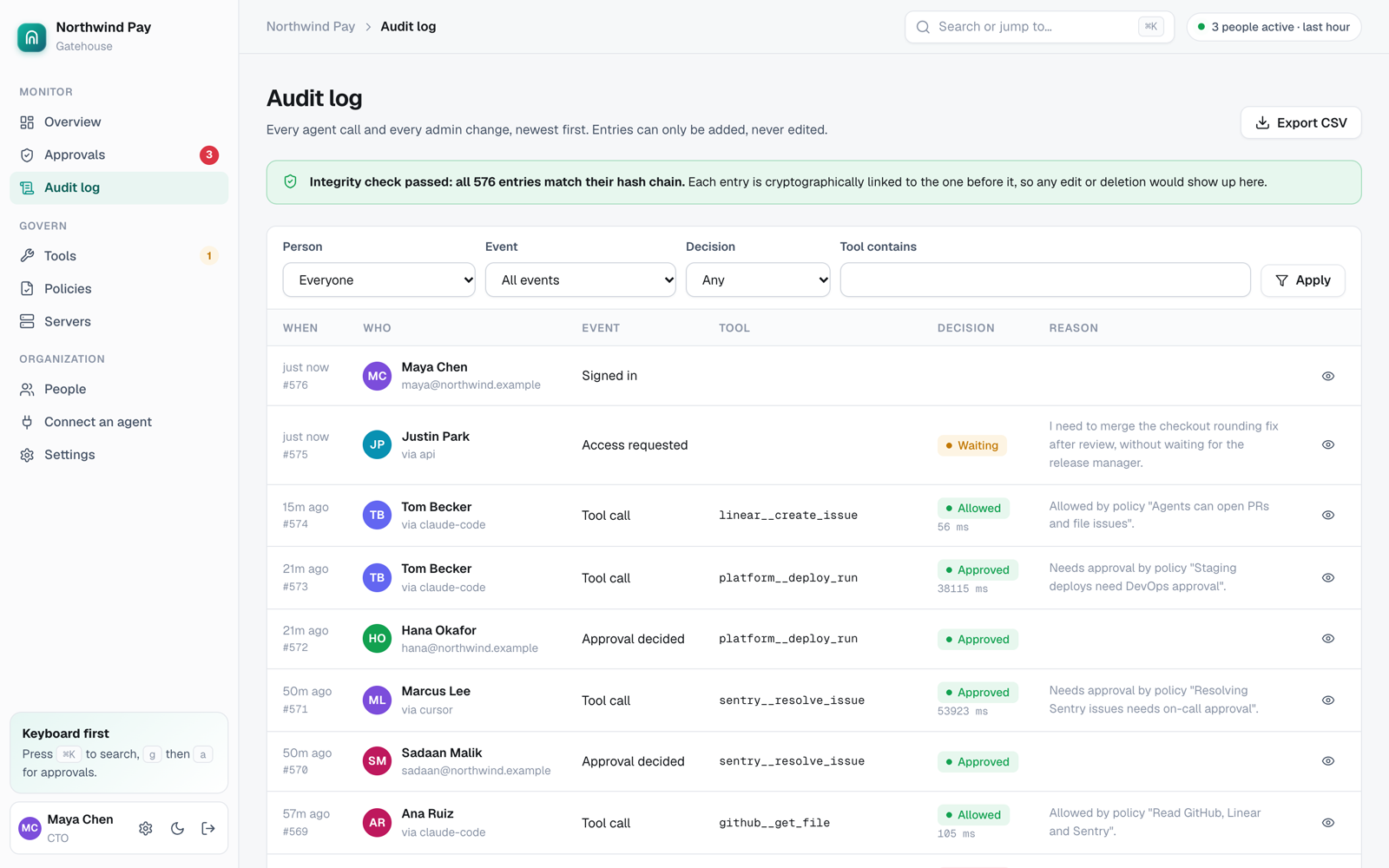
Built for the whole engineering organization
Developers
Keep your favorite agent. No tokens to manage. Ask for new tools from chat.
DevOps and platform
One place to connect servers and credentials. Approve risky changes in Slack.
Security and compliance
One policy and one audit trail across every agent vendor. SSO, MFA, SCIM, SIEM.
Engineering leadership
Roll agents out to every team with control you can show the board and auditors.
Designed to sit in front of your most sensitive systems
Gatehouse holds credentials to your code, data and cloud, so it's built defensively from the start.
Read about our security- Only hashes of tokens are stored. Agent sign-ins expire hourly and rotate.
- Credentials encrypted with AES-256-GCM, with keys from your KMS or Vault.
- Default deny: new tools are off, and no policy means no access.
- Agents never exceed the permissions of the person they act for.
- Strict content security policy, same-origin form checks, session binding.
- Append-only, hash-chained audit log with streaming to your SIEM.
Simple per-person pricing
A "person" is someone whose agents make calls in a month. Service accounts for CI are priced by volume.
Free
For a team trying governed agents.
- Unlimited MCP servers
- Policies and approvals
- Slack approvals
- 7-day audit history
Team
For engineering teams rolling agents out.
- Everything in Free
- Google and GitHub sign-in
- Access requests from chat
- 90-day audit history
Business
For companies with security reviews.
- Everything in Team
- SSO (OIDC and SAML), SCIM
- Active Directory and LDAP group sync
- MFA enforcement, IP allow-list
- Audit streaming to your SIEM
- 1-year audit history
Enterprise
For regulated and large organizations.
- Everything in Business
- Self-hosted or private cloud
- Your own keys (KMS, Vault)
- Air-gapped install
- Support and SLA
Keep everything inside your network
For banks, healthcare, government and anyone who can't send credentials or agent traffic to a third party. Gatehouse is a single service with a single data store, so it's easy to run yourself.
Self-hosting guidedocker build -t gatehouse .
docker compose -f deploy/docker-compose.yml up -d
# or on Kubernetes
helm install gatehouse deploy/helm/gatehouse \
--set baseUrl=https://gatehouse.internal- Docker, docker-compose and Helm
- Works without internet access
- Encryption key from AWS KMS, Vault or a file
Questions teams ask first
What exactly is a "tool"?
A tool is one action an MCP server offers to AI agents, like create_pull_request, run_query or deploy. MCP (Model Context Protocol) is the open standard Claude Code, Cursor, VS Code and other agents use to call them. Gatehouse sits between your agents and those servers.
Do developers have to change how they work?
No. They add one URL to their agent and sign in once. Normal work goes straight through. Only calls your policies mark as risky wait for a person.
Which agents work with it?
Any client that supports remote MCP servers over HTTP: Claude Code, Cursor, VS Code, Codex, and custom agents built with the MCP SDKs. CI jobs and scripts can use personal tokens.
Does Gatehouse see our data?
Tool calls pass through Gatehouse so it can check and record them. Secrets in results are redacted before they reach the model, and the audit log can store only a hash of arguments. If you need everything inside your network, run it self-hosted.
What happens if Gatehouse is down?
Agents can't reach your tools through it until it's back, which is the safe default for a security control. Self-hosted deployments run on your own infrastructure and backups.
Can we run it ourselves?
Yes. Gatehouse ships as a Docker image with a docker-compose file and a Helm chart. It runs without internet access and can load its encryption key from your KMS or Vault.